REF 001 / HERO

SHOPIFY → GOOGLE ADS · SERVER-SIDE

Stop losing Google Ads conversions to broken tracking.

WHY HUBNAR IS DIFFERENT

5 READINGS

  • Fully server-side tracking — resilient to ad blockers, iOS limits and fragile browser pixels
  • Radically simple setup — we even create your Google Ads conversion action
  • Full transparency — watch your conversions happen, live in your dashboard
  • Three independent capture layers — built for redundancy
  • Instant reporting — orders reach Google's API in seconds, so Smart Bidding learns faster

GET STARTED

T−3 CLICKS

Install on Shopify See how it works
  • NO CODE CHANGES
  • SHA-256 HASHED IDENTIFIERS
  • NO GOOGLE ADS PANEL

→ 3-CLICK SETUP — WE CREATE THE CONVERSION ACTION FOR YOU

FIG. 01 — CONVERSION LEDGER · LIVE EMBEDDED IN SHOPIFY ADMIN
SYNCED 14:02:11 UTC
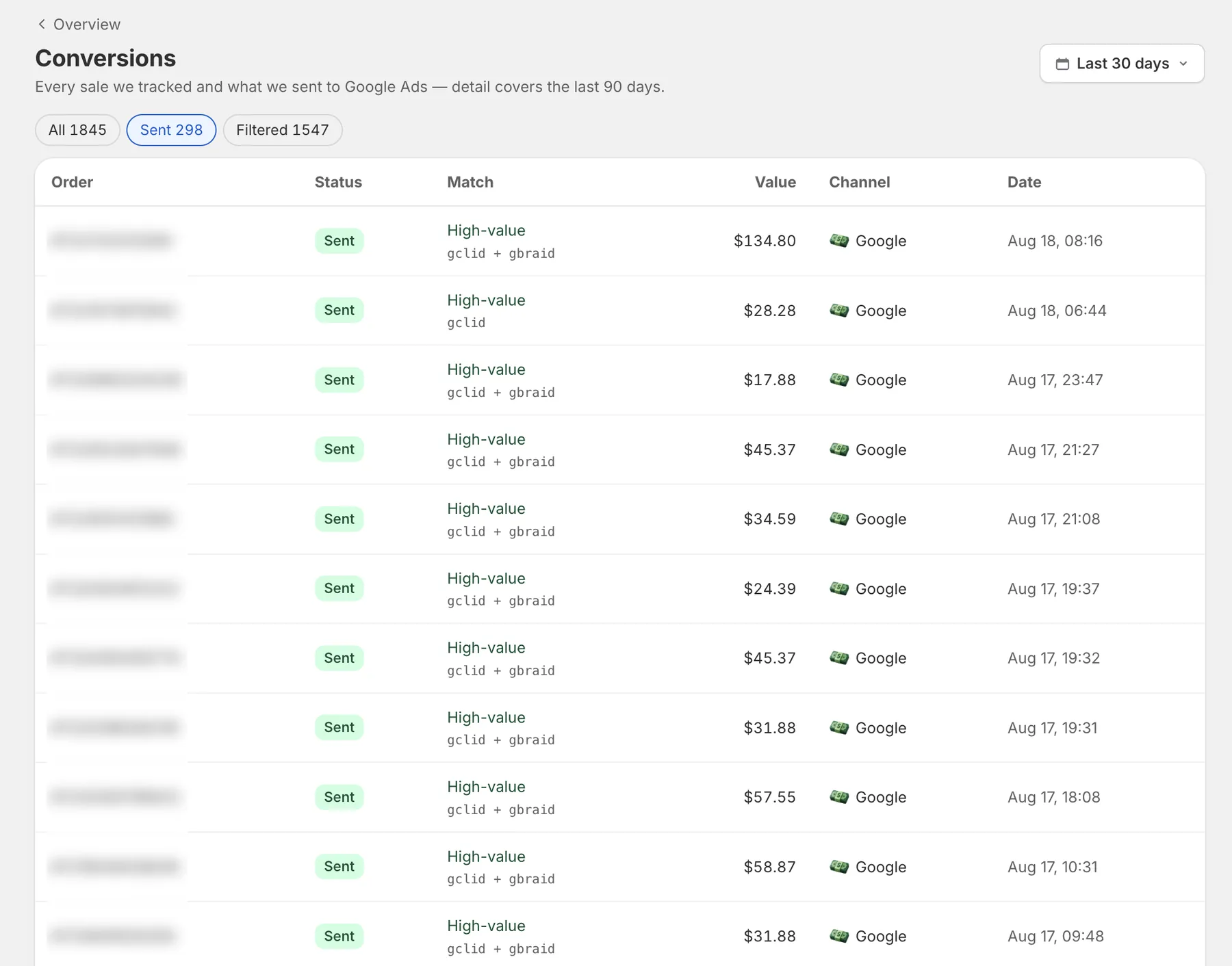
Hubnar conversion ledger — every sale sent to Google Ads with match quality and click IDs

REF 002 / THE PROBLEM

SIGNAL LOSS DETECTED

Your pixel is missing sales. Google agrees.

FAULT A

iOS & ad blockers kill pixels

Safari caps tracking cookies at 7 days, and ad blockers stop the browser pixel before it ever fires.

FAULT B

Consent setups break tags

Misconfigured banners and broken tag order silently stop tracking — even visitors who accept cookies get lost, and their orders go unattributed.

FAULT C

Google calls it “Misconfigured”

Tags flagged in your account, “direct” traffic that isn’t, and conversions that arrive days late — or never.

REF 003 / MECHANISM

ATTRIBUTION WINDOW: 30 DAYS

The click ID never gets a chance to die.

D0D5D10D15D20D25D30

T+00:00:00 · DAY 0

Visitor clicks your ad

Lands on your store with a gclid in the URL

T+00:00:01 · DAYS 0–30

Hubnar captures & keeps it

Persistent first-party ID, redundant capture

DAY 12, SAY · 13:58:47 UTC

Order arrives

Even if the customer returns “direct”

+3.2s LATER · 13:58:50 UTC

Sent to Google Ads

Full click conversion, server-side via webhooks

STEP 01 — CAPTURE

The moment a visitor lands from an ad, Hubnar records the click ID (gclid, gbraid, wbraid) across three independent capture layers. If one is blocked, the others still catch it — redundancy is the whole point.

STEP 02 — PERSIST

The click ID is tied to a persistent first-party ID kept alive for 30 days — through new sessions, cleared cookies, and return visits Google would call “direct”.

STEP 03 — REPORT

When the order comes in, Hubnar sends it to Google Ads as a full click conversion — server-side, via Shopify webhooks. No browser, no pixel, nothing to block.

REF 004 / SETUP

NO GOOGLE ADS PANEL REQUIRED

From install to tracking. Three clicks, no panel surgery.

T+0 — INSTALL

One click from the App Store

No code, no theme edits, no snippets to paste. Hubnar sets up its own tracking the moment it's installed.

T+1 MIN — CONNECT

Sign in with Google

Two clicks of OAuth. That's the entire "integration" — pick your Google Ads account and you're done.

T+2 MIN — LIVE

We create the conversion action for you

Hubnar builds the conversion action inside your Google Ads account, automatically — named, configured, ready. You never open the Google Ads panel. Clicks are being captured before you close the tab.

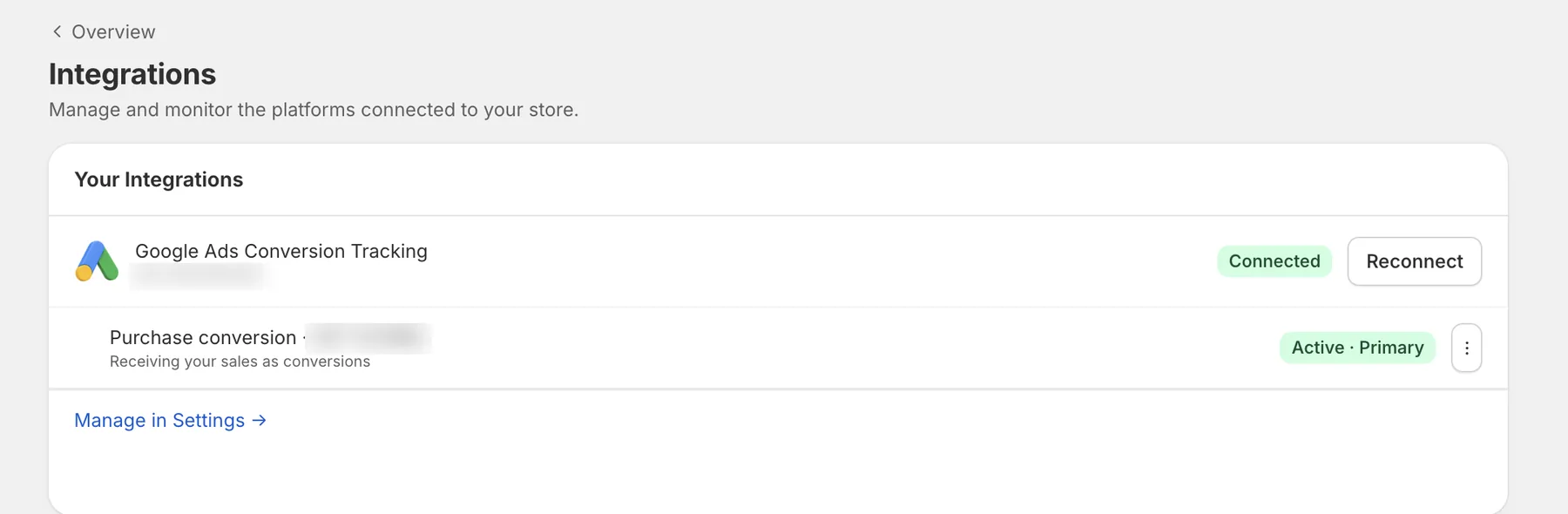
FIG. 02 — ONE CONNECTION CONVERSION ACTION CREATED FOR YOU
Hubnar integrations — Google Ads connected, purchase conversion active and primary

REF 005 / CAPABILITIES

6 MODULES · 0 CONFIG

Everything your conversion data needs. Nothing to babysit.

MOD 01

Server-side purchase tracking

Orders reach Google Ads through Shopify webhooks, delivered directly via Google’s official Ads & Data Manager APIs — not routed through GA4 or a fragile tag. Ad blockers and Safari’s ITP can’t touch them.

MOD 02

Full-funnel events

Add to cart and begin checkout, tracked alongside purchases — so Smart Bidding sees the whole journey, not just the last step.

MOD 03 · RECOVERY

Click-ID recovery

Truncated or lost gclids are restored from Hubnar’s capture log before the conversion is sent — no order left behind.

MOD 04

Campaign-level attribution

See which Google Ads campaign each order came from — last click, instantly. No digging through Google’s delayed, aggregated reports.

MOD 05

Enhanced conversions

Customer data is hashed (SHA-256) before it leaves your store. Privacy-safe, and exactly what Google’s matching wants.

MOD 06

One-click setup

Install, connect Google, done — Hubnar creates the conversion action in your Google Ads account for you. No code, no theme edits, no Google Ads panel surgery.

INCLUDED BY DEFAULT — EVERY PLAN, DAY ONE

NO FEATURE GATES

Server-side tracking Direct Google Ads API delivery Full-funnel events Click-ID recovery Enhanced conversions 30-day attribution Campaign-level attribution Auto-created conversion actions

The tracking that costs $200+ a month elsewhere is the Hubnar baseline. Every feature, every plan — the only thing that scales with your plan is order volume.

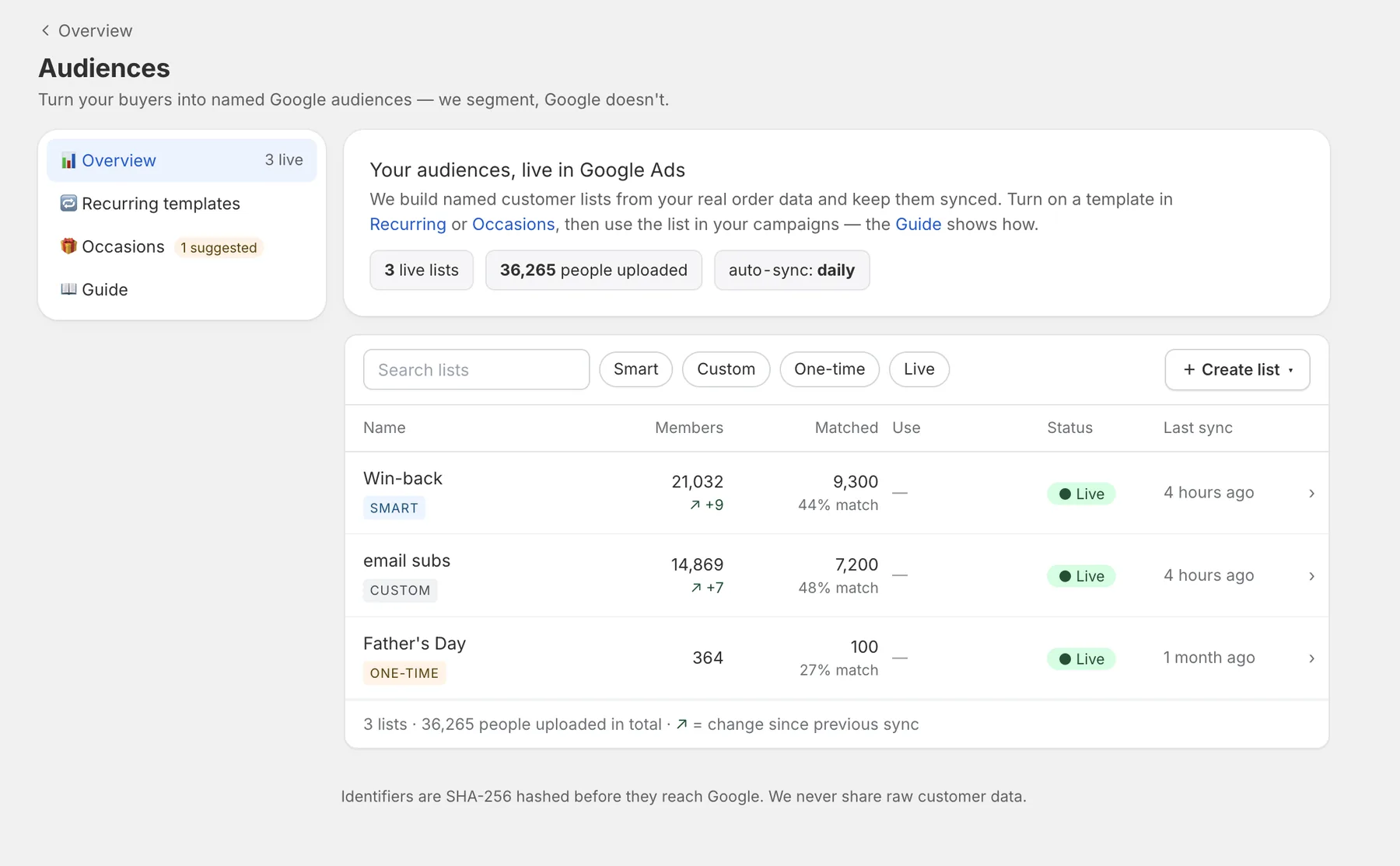
FIG. 03 — AUDIENCE SYNC BUYERS AS NAMED GOOGLE LISTS
Hubnar audiences — live customer lists synced to Google Ads with match rates

REF 006 / READINGS — WHAT CHANGES AFTER YOU INSTALL

HOW HUBNAR IS BUILT

30 days

attribution window — vs. Safari’s 7-day cookie cap

3 sources

independent capture layers — redundant by design

Live

every conversion visible in your Shopify admin as it happens

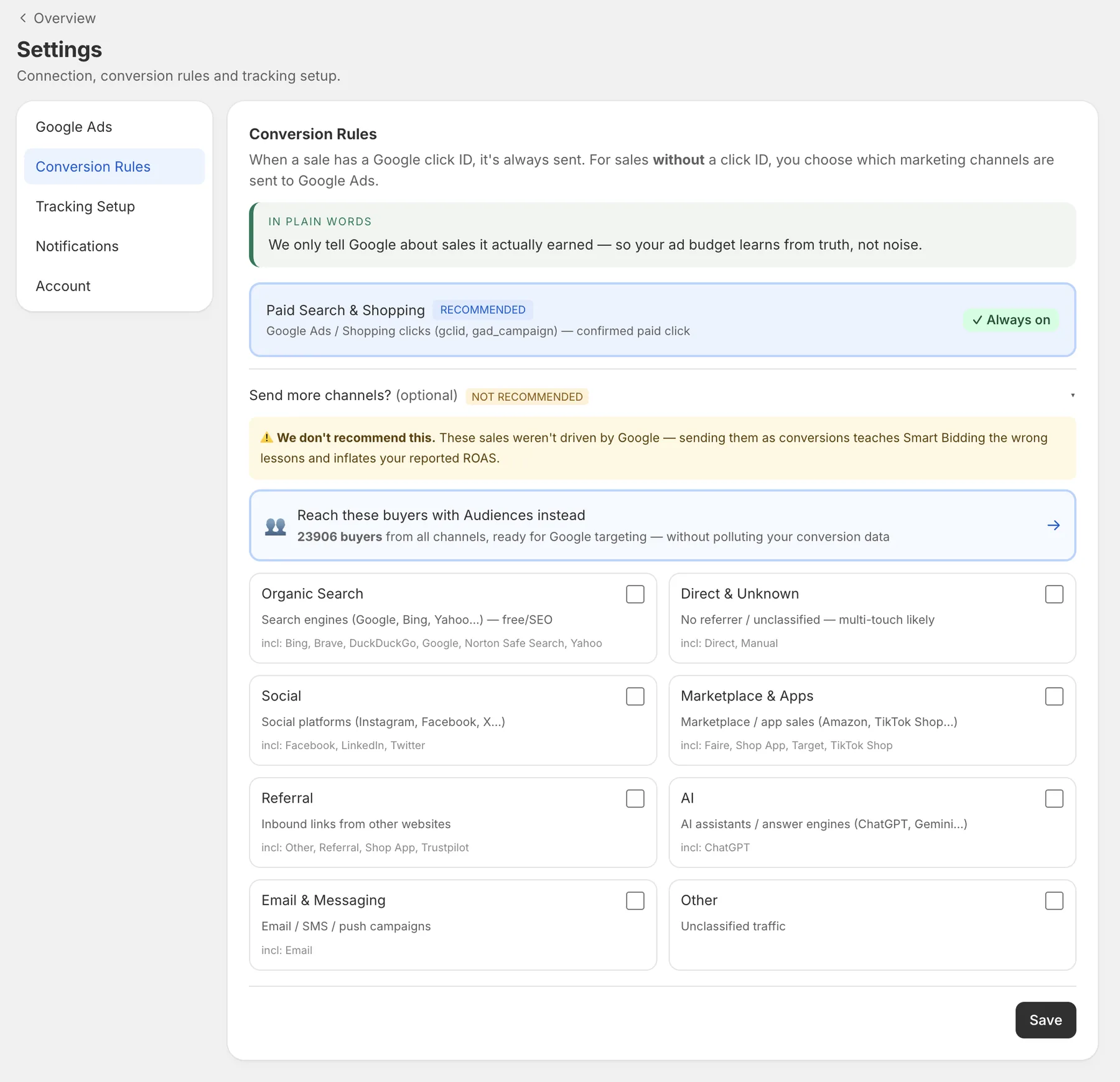
FIG. 04 — CONVERSION RULES ONLY SALES GOOGLE EARNED
Hubnar conversion rules — paid search and shopping always on; sending other channels not recommended, reach those buyers with Audiences instead
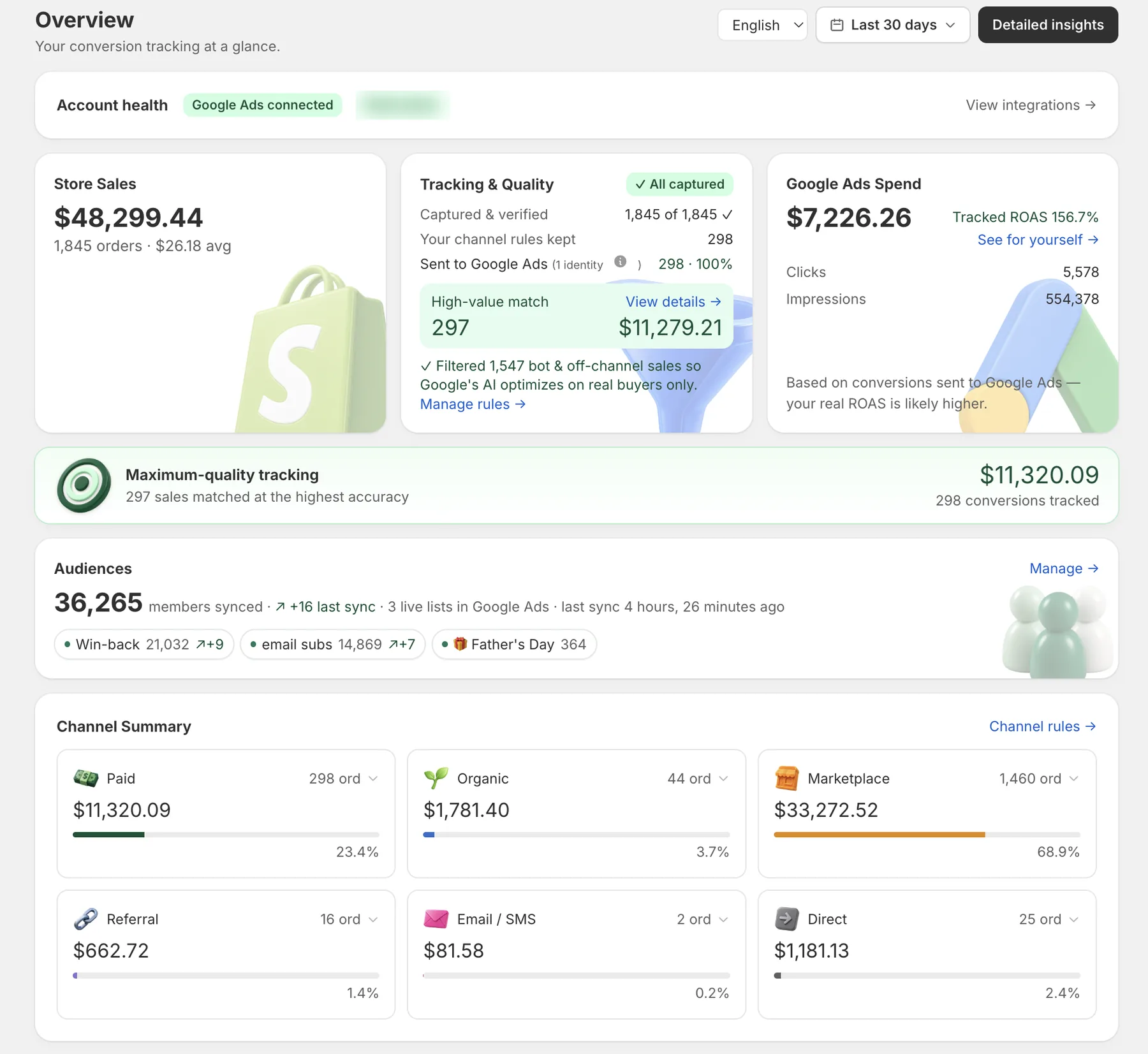
FIG. 05 — SIGNAL QUALITY VIEW 1,547 BOT & OFF-CHANNEL SALES FILTERED OUT
Hubnar overview — all orders captured, bot and off-channel sales filtered, only real paid buyers sent to Google Ads, channel summary explaining the split

REF 007 / PRICING

TRIAL: 30 DAYS · FULL FEATURE SET

Free for 30 days. No credit card.

Every plan includes every feature. Pricing scales with monthly order volume only — no feature gates, no surprises.

Starter

TIER 1
$89/mo

Up to 1,000 orders / mo

MOST POPULAR

Growth

TIER 2
$129/mo

Up to 3,000 orders / mo

Pro

TIER 3
$199/mo

Up to 10,000 orders / mo

Scale

TIER 4
Let's talk

10,000+ orders — contact us

Start your free 30-day trial

Cancel anytime from your Shopify admin.

REF 008 / FAQ

STRAIGHT ANSWERS

Straight answers

Q1Does it need code changes?+

No. Hubnar installs from the Shopify App Store and sets up its tracking automatically. Nothing to paste, nothing to edit in your theme.

Q2Does it work with consent banners?+

Yes — Hubnar runs alongside your consent setup without fragile tag-order dependencies, and customer identifiers are SHA-256-hashed before anything reaches Google. Your store’s privacy configuration stays fully in your control.

Q3How is this different from the Google & YouTube channel app?+

The channel app is built around browser-side tracking, which can be affected by ad blockers, iOS restrictions, consent setups and page-speed issues — the same limits that apply to any browser pixel. Hubnar works server-side: it captures click IDs across independent layers, keeps them available for up to 30 days, and reports purchases directly through Google's API. The two can run alongside each other.

Q4What data do you store?+

Ad click IDs, a first-party identifier, and the order data needed for attribution. Customer identifiers are hashed (SHA-256) before anything is sent to Google.

Q5How fast is setup?+

Install, connect your Google Ads account, and Hubnar creates the conversion action for you — no Google Ads panel work. Clicks are captured immediately; conversions appear as orders come in, typically the same day.

REF 009 / FINAL READING

Stop paying for clicks Google can’t see.

Install on Shopify

Install Hubnar, connect Google Ads, and watch your real conversions come back.